Article
Link Obfuscation: What It Is and When to Use It
SEO11 min read

James BrunettoCo-fondateur & CEO
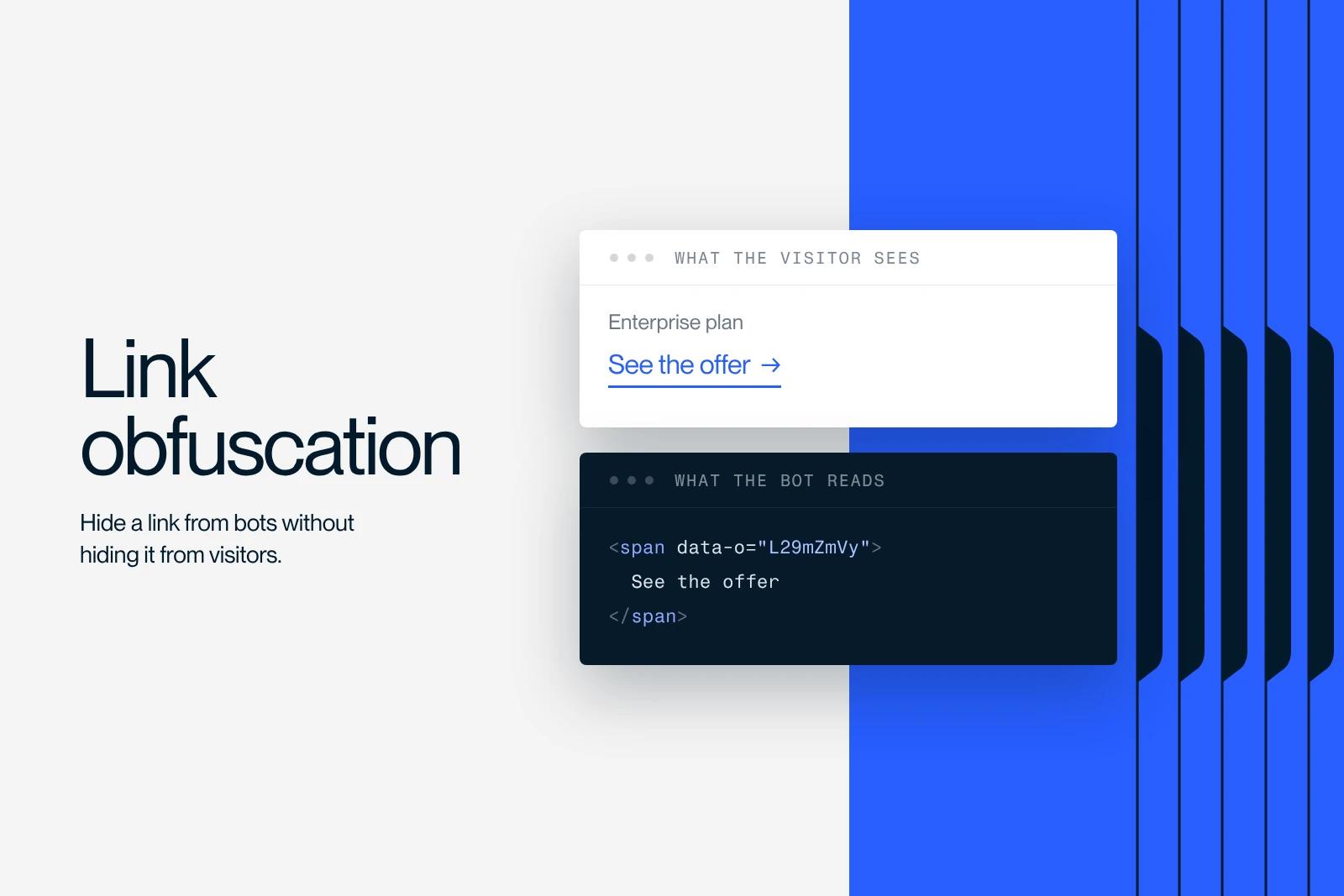
Link obfuscation means replacing a standard HTML link with an element that the browser makes clickable through JavaScript, but that a crawler does not recognize as a link. The visitor clicks and lands on the page. The crawler sees no destination to follow. The link disappears from the graph without disappearing from the screen.
Explore this post with…
The technique has been around for years in French SEO, almost always presented as a way to better distribute internal PageRank. That is not wrong. But for the vast majority of sites, it is an answer to a problem they don't have. Synqro is a Premium Partner Webflow agency, and we use obfuscation on a minority of projects, always for the same reason: a volume of URLs that has gotten out of control.
This article explains what the technique actually does, how it differs from nofollow, what Google says in its documentation, and at what threshold it is worth the work it costs.
What obfuscation does, and what it doesn't
Google is explicit about what it can follow. Its documentation on crawlable links, updated on December 10, 2025, comes down to one sentence: Google can only crawl a link if it is an HTML a element with an href attribute. The same page lists what its crawlers do not reliably follow: an a without an href, a span carrying an href, a link triggered by an onclick, a javascript: URL.
Obfuscation applies this rule as is. It doesn't trick anything, it simply doesn't write a link. That is what sets it apart from every other crawl control method, which leave the link in place and add an instruction on top.
| Method | The link exists in the HTML | Google follows the link | The target page is indexable | What it solves |
|---|---|---|---|---|
| Normal link | Yes | Yes | Yes | Nothing to solve |
| nofollow attribute | Yes | Treated as a hint | Yes | Qualifying a paid or unverified link |
| noindex tag | Yes | Yes, it has to crawl to read the instruction | No | Removing a page from the index |
| robots.txt block | Yes | No, the target is not crawled | Possible without being read | Saving crawl on a directory |
| Obfuscation | No | No, it doesn't see it | Yes, if reachable another way | Removing a link from the internal graph |
One consequence is almost always left out. An obfuscated link is not only invisible to Google, it is invisible to anything that reads the HTML without running JavaScript. Keyboard navigation skips the element unless you rebuild it by hand, screen readers don't announce it as a link, and opening it in a new tab no longer works. This is a real accessibility cost, not a formality.
Why it is not the same as nofollow
The confusion is constant and it dates back to 2009. Matt Cutts announced at the time, as Search Engine Land reported on June 16, 2009, that Google had changed its algorithm more than a year earlier: nofollow links are no longer excluded from the distribution calculation. On a page with ten links, five of them nofollow, the value does not concentrate on the remaining five. It is still divided by ten, and the share assigned to the nofollow links goes to no one.
So nofollow does not redirect value, it deletes it. Obfuscation removes the link before the count: the page carries five links, and the division is by five. That is the only difference that matters, and it is also what makes the technique serious, since it changes the site's structure as Google sees it.
The downside comes with it. An obfuscation mistake removes a page from crawling without leaving a readable trace in the HTML, so without any alert. It is the kind of failure that takes three months to diagnose.
Does Google consider it cloaking?
No, as long as the page served is the same for everyone. Google's spam policies, updated on August 28, 2026, define cloaking as presenting different content to users and search engines with the intent to manipulate rankings and mislead users. The two examples given are a page about travel destinations shown to search engines while the user sees a page about drugs, and keyword stuffing triggered only when the agent requesting the page is a crawler.
Obfuscation does neither. The content served is identical, only the navigation changes. The nuance comes down to one condition: if you obfuscate by detecting the user agent, serving one HTML to crawlers and another to humans, you have moved from obfuscation to cloaking. The test fits in one line: the HTML must be the same whoever the visitor is.
One point deserves honesty. Google has never published a page that explicitly allows the practice. Articles claiming that Google accepts it are extrapolating. What can be verified is that the technique meets none of the criteria in the cloaking definition, and that it appears on no list of penalized practices, unlike other methods covered in our article on black hat SEO.
The three cases where obfuscation makes sense
Facets and filters in a catalog
An ecommerce catalog with combinable filters generates one URL per combination. Three filters with ten values each already produce a thousand pages that have no reason to exist. Canonical tags and noindex handle indexing, but they don't reduce the number of links the crawler discovers when it lands on the page. Obfuscation does.
Navigation blocks repeated at large scale
An 80-link menu on 50,000 pages means four million internal links, almost all of them pointing to a handful of destinations. Obfuscating the part of the menu that serves navigation rather than SEO changes the site map in a measurable way. On a 200-page site, the same move changes nothing at all.
Pages useful to visitors but irrelevant in search
Internal comparison tools, login areas, booking funnels, multi-step forms. These pages need to stay reachable but don't need to carry weight in the internal linking. The noindex tag removes them from the index, but Google keeps crawling them to read the instruction. Obfuscating the links that lead to them solves the problem further upstream.
The cases where it is useless, which means almost all of them
The most common justification is crawl budget. But Google itself quantifies the scope. Its documentation on crawl budget management, updated on July 22, 2026, targets sites with more than a million unique pages whose content changes moderately, and sites with more than ten thousand unique pages whose content changes very quickly. Google specifies that these numbers are a rough estimate, not exact thresholds, then adds a sentence that reads as an instruction: if your site does not have a large number of pages that change rapidly, or if your pages seem to be crawled the same day they are published, you don't need to read this guide.
A business website, a 200-article blog, an agency site or a SaaS with a few hundred URLs therefore gains nothing from obfuscating anything. The time spent writing the script, maintaining it and fixing the accessibility it breaks would be better spent reworking the internal linking for good, deleting empty pages and cleaning up redirect chains.
Our position is clear. Obfuscation is a last-resort tool. It comes after the architecture, after pruning useless pages, after fixing redirects. A site that deploys it before doing that work moves a symptom instead of treating the cause.
How to set it up
The principle has three parts. A neutral element carries the visible anchor text, a data attribute carries the destination in a form the crawler won't read as a URL, and an event listener restores navigation on click.
In the markup, the link <a href="/target-page">Anchor</a> becomes <span class="obf" data-o="L3RhcmdldC1wYWdl" role="link" tabindex="0">Anchor</span>, where the data-o value is the destination encoded in base64. A script listens for clicks and the Enter key on elements with the obf class, decodes the value with atob and triggers navigation.
Base64 encoding is not security, it is a precaution to keep a plain URL from being recognized as one. Two points not to overlook: without role="link", without tabindex="0" and without handling the Enter key, you make keyboard navigation impossible. Also handle middle clicks if your visitors open tabs.
On Webflow, in practice
Webflow has no obfuscation option. Setting it up requires custom code, placed before the closing body tag at the site or page level, and elements to which you add a class and custom attributes in the Webflow Designer. A link coming from the CMS cannot be obfuscated from the link field: you have to rebuild it as a generic element.
In reality, the question rarely comes up on Webflow. Sites that reach the URL volume where obfuscation becomes relevant are rarely Webflow sites, and when they are, the useful work happens upstream: reducing the number of generated URLs, prioritizing collections, checking what the crawler actually explores. That is exactly what a technical SEO audit covers.
How to check that obfuscation works
Three checks are enough, in this order.
- The URL Inspection tool in Google Search Console, rendered HTML tab. The link must not appear as an a tag in either the source code or the rendered page.
- A crawler run twice, first without and then with JavaScript rendering. The target page must drop out of the list of internally discovered URLs in the first pass.
- A manual keyboard test, Tab then Enter, and a pass with a screen reader. This is the check people skip, and also the one that causes the most expensive regressions.
The habit that matters more than the technique
For Les Fermes de Marie, a luxury hotel in Megève, our work covered an SEO audit and more than fifty technical fixes. Obfuscation was not one of them, and that is exactly the point: at that scale, the gains were elsewhere, in the structure and cleanliness of the code. The details are in the Les Fermes de Marie case study.
If you are torn between obfuscating and rebuilding your architecture, the answer lies in your crawl logs, not in an article. Our Webflow SEO agency team knows how to read these files. Let's talk about your project.
Frequently asked questions
None of Google's spam policies targets obfuscation. The definition of cloaking, updated on August 28, 2026, involves serving different content to crawlers and users with the intent to manipulate, which obfuscation does not do since the HTML served is identical for everyone. That said, Google has never published a text that explicitly allows it.