Article
What is Webflow? The visual CMS for building your website
Webflow14 min read

Guillaume SchluppConsultant SEO
What is Webflow? A visual CMS for building a high-performing website. Build your website easily and take advantage of advanced features.
Explore this post with…
What is Webflow, in practical terms, and why are so many companies adopting it to build websites that are faster to produce, easier to evolve and more consistent in design? This guide explains how Webflow works, its strengths, its limits, and the criteria for choosing Webflow methodically, based on your goals.
At Synqro, we support companies in Paris as a performance-driven Webflow agency in Paris. We build sites that need to look good but, above all, be useful: clear, fast, measurable and able to support growth. Our expertise combines structure, content, SEO and clean production. In other words, we see Webflow not as a "no-code" tool, but as a reliable web production system.
What is Webflow and who is this visual CMS for?
What is Webflow? It is a CMS (a content management system) that lets you design, publish and manage a website through a visual approach, without relying on a complex development pipeline. The editor is built on components and styles, much like front-end development, yet it stays accessible to a marketing team. The result is not "a theme" but a controlled foundation that is easier to maintain.
What sets Webflow apart is how quickly you can go from an idea to a structured page, with fine control over the result. For a non-technical user, there is a real learning curve, but the ecosystem is designed to feel intuitive once the basics are clear. That is exactly what makes it a good fit for building your site through iteration, rather than as a frozen project.
Key points to keep in mind before you start:
- Understand what Webflow is: a production platform, not just an editor.
- Decide how much autonomy you want for your in-house team.
- Plan a structure for pages and content from the start.
- Think about how the website will evolve, not just about launch day.
Webflow CMS and content management: publish without breaking the design
Webflow's CMS is useful when you want to publish and organize structured content: case studies, service pages, team members or blog posts. The Webflow CMS works with Collections, fields and dynamic templates. This approach supports regular publishing while protecting the design: you define a template once, then you feed it content.
For a marketing team, the benefit is twofold: produce faster and stay consistent. Content management becomes a process, not a series of improvised additions. Webflow's rules are simple but demanding: if the structure is poorly planned, the site becomes hard to evolve. That is why the initial architecture matters so much, especially if you need to customize recurring sections.
What to define for a robust CMS:
- Define your content types and their fields from the start.
- Structure your templates to avoid unnecessary variations.
- Set editorial rules to keep the experience stable.
- Limit exceptions to preserve quality over time.
Webflow Designer: interface, HTML, CSS and logic without coding
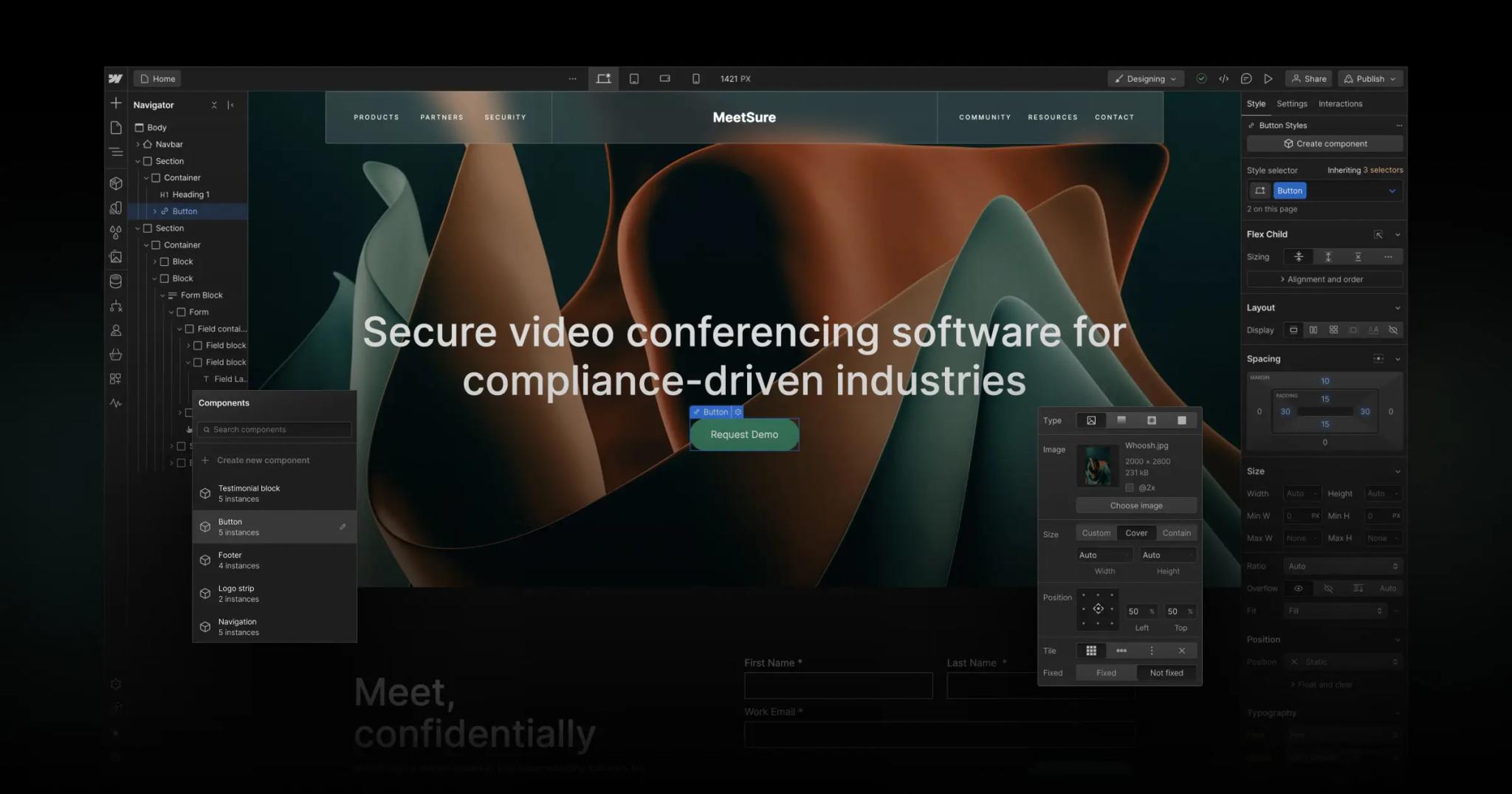
The Webflow Designer is where production happens. It is not a classic block builder: the interface exposes logic close to front-end development, with styles, classes, breakpoints and components. That calls for a minimum of rigor, but it lets you get a professional result without constantly writing lines of code. This is where Webflow is especially relevant for teams that want to control their brand identity.
Webflow lets you handle HTML and CSS visually. You design, test, adjust and publish in the same environment. For a developer, the logic remains easy to follow. For a marketing user, the goal is to learn the tool step by step, without turning every change into a technical ticket.
What the Designer makes possible day to day:
- Build a site with a clear hierarchy of sections and components.
- Customize pages without breaking the whole.
- Control responsive behavior precisely.
- Keep the design consistent across the entire journey.
Key Webflow features: animations, templates, plugins and customization
Webflow's key features cover production, layout and interactions. When talking about key features, you need to separate the essential from the superfluous. Webflow offers a solid base: reusable components, global styles, CMS logic and fine control over interactions. Webflow's power shows when you want to build credible marketing pages without piling up dependencies.
Animations (interactions) can improve readability and engagement as long as they serve the content. Templates speed up the build, but become limiting if your brand needs real differentiation. As for plugins, the ecosystem exists, but the Webflow approach is often healthier: connect Webflow to specialized tools rather than overloading the core of the site.
Key Webflow features to use methodically:
- Interactions to guide attention without overloading the page.
- Templates to get started quickly, then customize what matters.
- Integrations to avoid stacking up plugins.
- Component logic to scale production.
Webflow vs WordPress: real differences and what they mean for your website
Webflow vs WordPress pits two philosophies against each other. WordPress is extensible through themes and plugins, but complexity grows fast: compatibility, updates, security, performance. Webflow stands out as a more controlled approach: fewer intermediaries, more consistent production and greater stability as the project grows. Compared with WordPress, the question is not only the upfront cost, but also the maintenance cost and the quality of execution.
Unlike WordPress, Webflow often reduces technical noise, but it requires a stricter production method. The risk is not "technical" but a lack of governance: if your components and templates are not well defined, you lose the advantage. For a marketing website, the choice depends on your ability to produce cleanly and maintain a standard.
Criteria for choosing between the two tools:
- Assess the technical debt that comes with plugins and themes.
- Compare production speed and how easily the site can evolve.
- Analyze the governance needed to keep things consistent.
- Tie the decision to your business goals, not to trends.
SEO and performance: is Webflow good for search rankings?
Webflow can be very effective for SEO if structure and content are under control. The key is not "the tool" but the execution: heading hierarchy, internal linking, speed, content quality and page consistency. Webflow lets you manage the essential settings, including meta tags, URLs and the attributes needed for accessibility, such as alt attributes.
Optimization should stay pragmatic: clarify intent, structure pages, limit duplication and work on the experience. Performance is not just a score: it is the ability to load fast, stay stable and convert. Performance becomes an asset when it is built into the production method, not added at the end of the project.
Useful SEO actions in Webflow:
- Structure your pages so they read clearly for search engines and users.
- Optimize performance with well-managed assets and clean components.
- Control metadata and URLs to avoid noise.
- Work on your content to match a specific search intent.
Webflow Ecommerce: online stores, use cases and limits
Webflow Ecommerce suits simple to mid-sized online store projects: a limited catalog, high design standards and a polished marketing journey. The advantage is consistent production: you keep the same logic for pages, components and CMS. For acquisition-focused brands, it is often a good balance between speed and control.
On the other hand, for complex ecommerce (huge catalogs, many variants, advanced logistics), Webflow can reach its limits. In those cases, you need to decide whether the tool should handle sales or only the marketing experience, connected to a dedicated solution. Webflow has one clear strength: building a credible commercial storefront. So use it where it is most relevant.
When Webflow Ecommerce is a good choice:
- An online store focused on brand and content, with a controlled catalog.
- A need to customize the experience without depending on a rigid theme.
- Strong marketing goals: landing pages, storytelling, proof.
- UX as a priority over very advanced back-office logic.
Webflow hosting: security, speed and day-to-day operations
Webflow hosting is a strong point for teams that want a stable site without managing servers and configurations. Webflow provides managed infrastructure, which reduces the operational load. It does not replace good practices, but it limits sources of incidents. For a professional website, this reliability is part of the project's value, especially when the team needs to publish often.
On performance, hosting contributes to overall stability, but design and content decisions remain decisive. A site can be well hosted and still slow if it is poorly built. The real gain comes from method: lean components, optimized images, clean CMS logic. That is also what makes content updates easy without breaking what already exists.
What hosting changes in practice:
- Less dependence on a technical stack and patches.
- Safer publishing with a clear go-live process.
- Stable performance if the site is built rigorously.
- Easier operations for an autonomous marketing team.
Why choose Webflow to build websites and gain autonomy
Why Webflow? Because it lets you build websites faster, with greater visual and technical consistency, provided you have a method. Choosing Webflow is not a "tool" decision, it is a production decision. You are investing in a system that should make you autonomous: publish, adjust, test and improve without depending on a heavy web development cycle.
A good use case is building a scalable marketing site: service pages, proof pages, editorial content and acquisition iterations. Webflow lets you create and maintain a clear foundation if you govern your components. The goal is to protect the user experience, because that is what drives credibility and conversion.
Webflow advantages to match against your needs:
- Build sites that are consistent, reusable and easy to evolve.
- Speed up production without losing control of the design.
- Reduce dependence on plugins and constant fixes.
- Strengthen your team's autonomy over the long term.
Synqro: our method for designing a high-performing Webflow site
At Synqro, we treat Webflow as an industrial tool. Our goal is to deliver a well-governed Webflow site, not a pile of pages. We start by defining the sitemap, components, CMS and conversion goals. Then we produce the design, the build and the content with performance in mind, with systematic quality control.
Our value lies in the method: structure in order to iterate. If you need to publish, adjust and launch campaigns, your site must absorb that without building up debt. Webflow provides the building blocks, but architecture and discipline make the difference. That is also where working with an agency pays off: avoiding invisible mistakes that become expensive over time.
What we put in place for our clients:
- A website build structured around reusable components.
- Clear CMS governance so you can publish without drifting.
- Optimization focused on performance and quality of execution.
- A production framework that is measurable, with tracking and iterations.
Conclusion: how to choose Webflow rationally
Webflow is a platform especially well suited to marketing sites, content-driven projects and teams that want to produce without constantly relying on a developer. Webflow can provide a solid foundation if you invest in structure, consistency and method. The tool is not magic, but it can become a competitive advantage when it is well governed.
If your priority is to move fast without sacrificing quality, Webflow can be the answer. If you need a complex application, the trade-off may be different. What matters is to decide based on the project: type of site, publishing frequency, quality standards and operational capacity.
Decisions to make before you start:
- Clarify the goal of the site and the role of the CMS.
- Decide on the autonomy you want for your in-house team.
- Compare the constraints with WordPress, Wix and other options.
- Define a production method, not just a tool.
Key takeaways:
- Webflow lets you produce a consistent website if the structure is well defined.
- Choosing Webflow is a decision about method, not just a tool preference.
- Webflow offers a CMS and a Designer that make teams more autonomous.
- Webflow offers interactions and a useful visual approach, as long as you keep them restrained.
- Webflow provides a robust base for marketing, content and reasonably sized ecommerce projects.
Frequently asked questions
Webflow is a tool for building and publishing websites that combines a visual editor and a CMS. It is used to build pages, manage dynamic content and publish a website without relying on a heavy technical pipeline. It is especially useful for marketing and editorial sites that need to change often.


