Article
Website brief: template, filled example and checklist
Webflow10 min read

James BrunettoCo-fondateur & CEO
A website brief, also called a website requirements document, describes what a site must achieve, for whom, with which content and features, on what budget and timeline. It gets you comparable quotes and gives you a reference to check the site against at delivery. Here are the sections to fill in, a complete example for a B2B redesign, the SEO and migration part most templates skip, measurable acceptance criteria and the grid we recommend for scoring agency proposals.
Explore this post with…
In short: a good website brief runs to 6 to 12 pages. It describes measurable goals and constraints, not ready-made solutions. The three sections that prevent the most bad surprises are URL migration, acceptance criteria and who owns the site after delivery. At Synqro, a full website takes 8 to 12 weeks and costs €3,000 to €20,000 excluding VAT.
What a website brief is for
It has three jobs, and it helps to keep them in mind while writing it.
First, it aligns your own team. Writing down what the site must deliver forces leadership, marketing and sales to agree before the first euro is spent. This is often when you discover everyone was expecting a different website.
Second, it makes quotes comparable. Without a shared document, three agencies answer three different projects, and you end up comparing prices that do not describe the same thing.
Third, it is the reference at delivery. On acceptance day, the question is not whether people like the site. It is whether the site meets each written requirement.
What it is not: a mock-up. Describing the need ("a visitor must be able to request a demo in under three clicks") beats drawing the solution ("a blue button top right"). Let the agency propose, and judge the proposal against your goals.
The 9 sections of a website brief
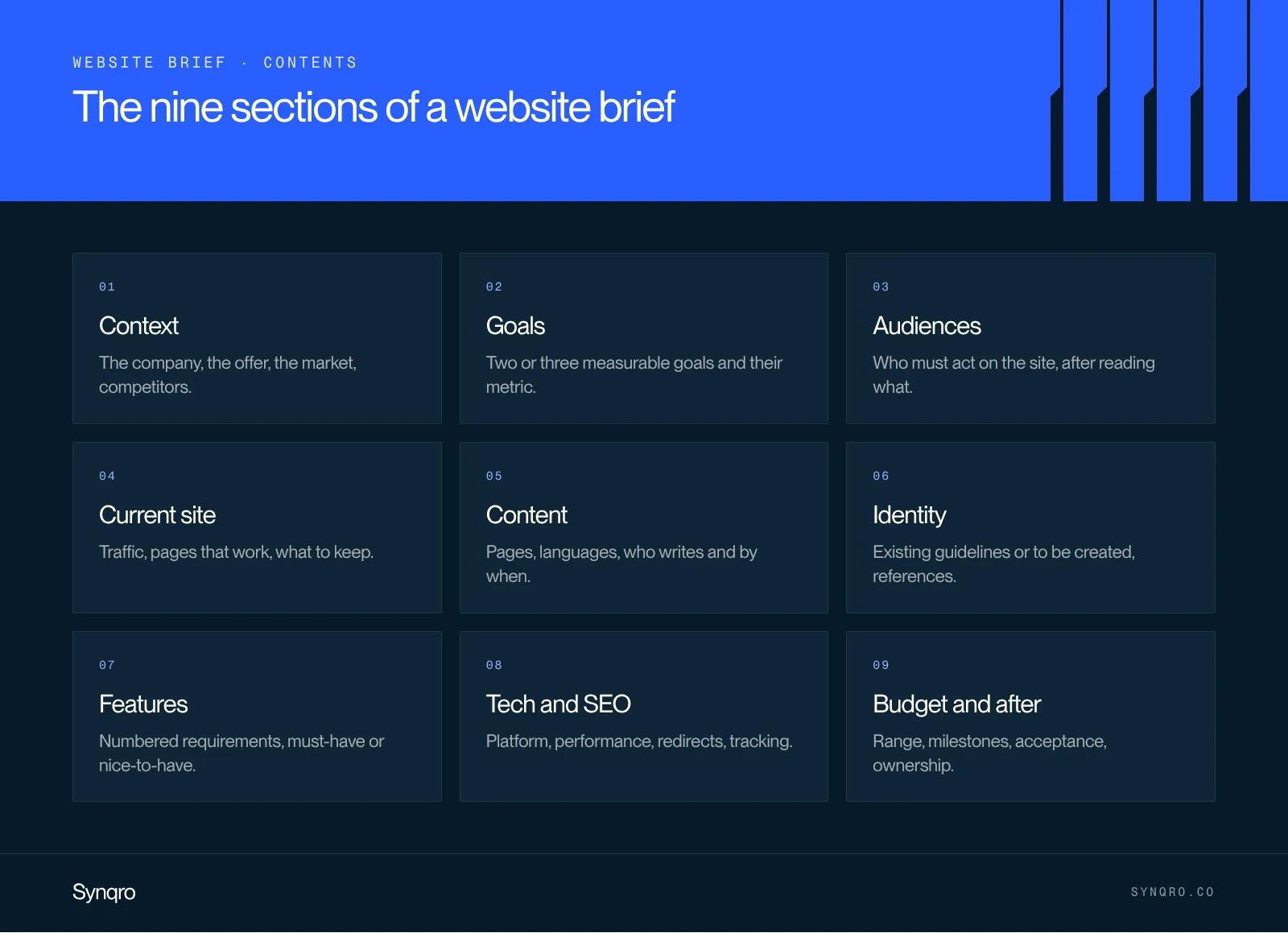
| Section | What goes in it | The question to ask |
|---|---|---|
| 1. Context | The company, the offer, the market, competitors | What does a supplier need to know to understand our business in ten minutes? |
| 2. Goals | Two or three measurable goals, with the metric for each | What should change in a year thanks to the site? |
| 3. Audiences | Visitor profiles and what they are looking for | Who must take action on the site, and after reading what? |
| 4. Current site | The existing site, its traffic, the pages that work, its limits | What do we keep, what do we drop? |
| 5. Content and structure | The list of pages, who writes, in which languages | Who writes the copy, and by when? |
| 6. Identity and design | Guidelines, references, constraints | Is the visual identity approved or still to be created? |
| 7. Features | Forms, CRM, client area, multilingual, blog | What must the site do, not just display? |
| 8. Tech, SEO and migration | Platform, hosting, performance, redirects, tracking | How do we avoid losing the traffic we already have? |
| 9. Budget, timeline and post-launch | Budget range, milestones, acceptance, maintenance, ownership | Who does what after launch? |
Two tips on format. Number the requirements (F1, F2, T1…): the agency can answer line by line, and acceptance testing will use the same list. And separate must-haves from nice-to-haves. A list where everything is a priority helps nobody make trade-offs.
For section 5, start from a website structure rather than a loose list of pages. For section 6, if your identity is not settled, your brand guidelines should be ready before design begins.
A filled example: a B2B website redesign
To make the template concrete, here is a summarised brief for Norvane, a fictional 50-person industrial company we also used in our brand platform article. The figures are illustrative.
| Section | Norvane example |
|---|---|
| Context | Maker of technical parts, industrial clients in France and Belgium, 3 to 9 month sales cycle |
| Goals | Go from 8 to 20 qualified quote requests a month within 12 months; halve "do you stock this part?" calls |
| Audiences | Industrial buyers (price, lead times, certifications); engineering offices (datasheets, CAD files) |
| Current site | Built in 2018, 40 pages, 2,500 visits a month, 3 product pages bring 60% of organic traffic |
| Content | 25 pages in French and English; copy written by Norvane, edited by the agency; 12 product pages to enrich |
| Identity | Logo and colours kept; guidelines to complete for the web |
| Features | Quote form connected to the CRM; datasheet downloads; filter by material |
| Tech and SEO | Every old URL redirected with a 301; product pages indexable; platform left to the agency, with reasons |
| Budget and timeline | €15,000 to €20,000 excluding VAT; live before the March trade show; two people trained to edit |
Notice what is missing: no button colours, no technology imposed without a reason. Notice the numbers too. "More quote requests" cannot be checked. "From 8 to 20 a month" can.
The SEO and migration section most templates skip
This is the section where a redesign can cost the most, and the one most online templates cover in a single line. A site that changes URLs without redirects loses part of the traffic its old pages took years to earn.
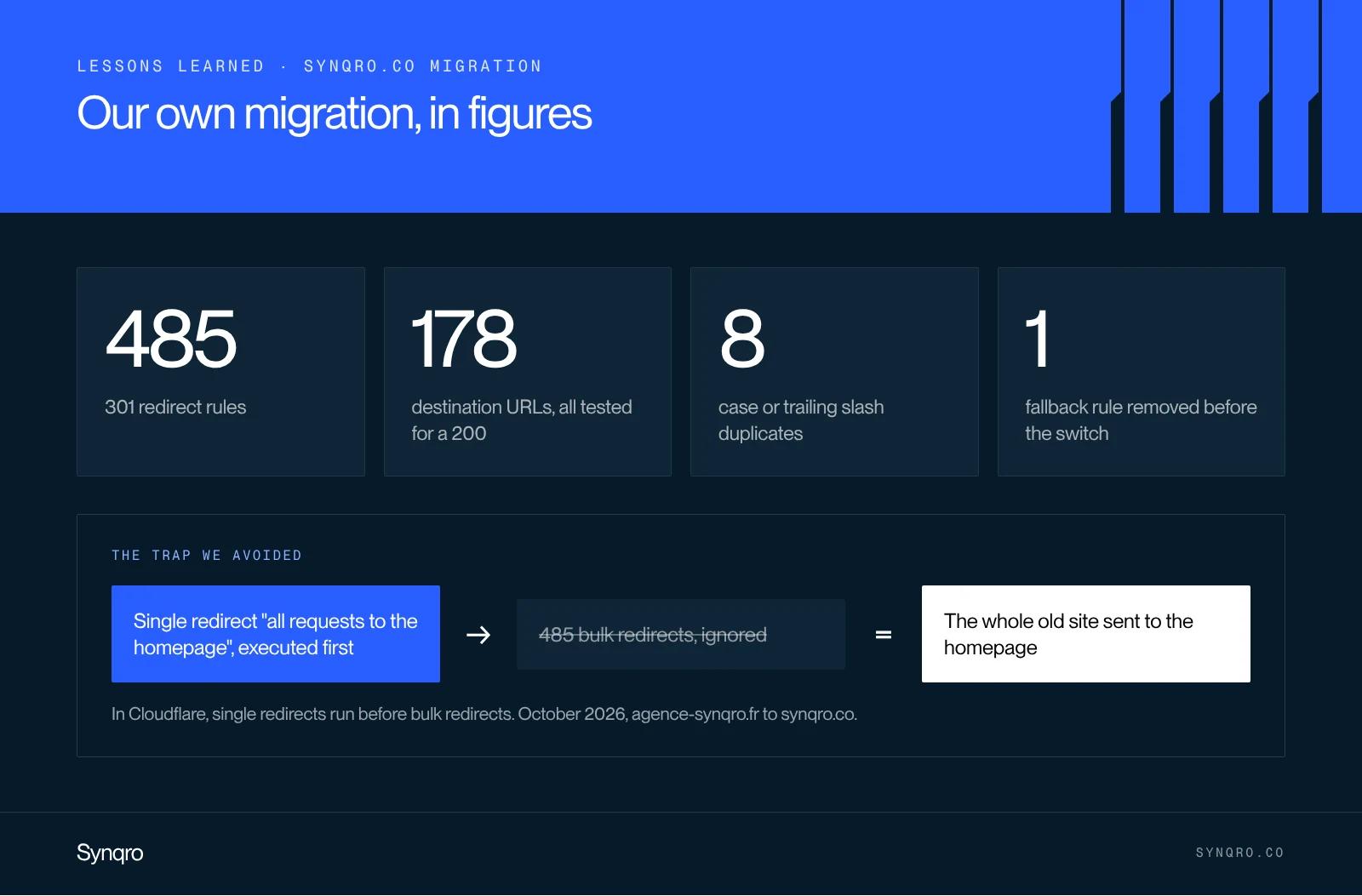
We went through it ourselves in October 2026, moving our own site from agence-synqro.fr to synqro.co, and from Webflow to a Sanity and Astro build. A few figures from that project give a sense of scale:
- 485 redirect rules for a site of about 150 articles and 65 non-blog pages;
- 178 destination URLs, each checked for a 200 response before the switch;
- 8 duplicates that differed only by a capital letter or a trailing slash (/en and /en/, for example);
- one fallback rule that would have broken everything. The plan included an "all requests to the homepage" rule on top of the list. But in Cloudflare, single redirects run before bulk redirects, as its documentation states. That rule would have sent all 485 old URLs to the homepage. We removed it before going live.
What we now write into every redesign brief:
- Redirect map. A file matching each old URL to its new one, delivered before launch. For Webflow, see our guide to 301 redirects.
- Destination checks. Every target returns a 200, with no redirect chains.
- Search Console. New sitemap submitted, change of address filed if the domain changes, errors monitored for four weeks. Google describes the process in its guide to site moves.
- AI answers. In Search Console settings, the generative AI setting stays on "Include". On "Exclude", the site disappears from AI Overviews and AI Mode.
- Structured data and tags. Titles, meta descriptions, Organization and Article markup carried over or improved, never lost.
- Rollback. The old site stays available for a few days so you can switch back if something goes wrong.
Budget and timeline: what to write
Give a budget range. Many companies hide it "to see what agencies come up with". The result is the opposite of what they want: each agency imagines a different project, and the quotes no longer compare. An honest range lets the agency propose the best possible project within it.
For a sense of scale, a full website at Synqro costs between €3,000 and €20,000 excluding VAT. It takes 8 to 12 weeks, and a single landing page takes 2 weeks. The price mostly depends on the design (adapting a template or fully custom), whether an identity is created, the number of pages and languages, and the SEO and GEO work built in from the start. Our guide to website cost breaks these differences down.
In the timeline, plan three milestones signed off in writing: key page designs, the full site on a staging environment, final acceptance. And name who signs off on your side. Projects rarely slip because of the tech. They slip because copy or approvals arrive late.
Acceptance criteria
Acceptance testing is where you check the site before signing it off. Without criteria written in advance, it turns into a list of preferences. Here are the ones we put in a brief, each with a measurable threshold.
| Criterion | Threshold | How to check |
|---|---|---|
| Loading (LCP) | 2.5 s or less | PageSpeed Insights, on mobile |
| Responsiveness (INP) | 200 ms or less | PageSpeed Insights, field data after launch |
| Visual stability (CLS) | 0.1 or less | PageSpeed Insights |
| Text contrast | 4.5:1 minimum | Contrast checker on every text colour |
| Redirects | 100% of old URLs return a 301 to a 200 page | Test the redirect file before and after the switch |
| Forms | Every submission reaches the CRM and triggers the expected email | Real test of each form |
| Indexing | Key pages indexable, valid sitemap | URL inspection in Search Console |
| Editing | Two trained people publish a page without help | Exercise during training |
The first three thresholds are the ones Google uses for Core Web Vitals, measured at the 75th percentile of visits according to the official documentation. Write them in as they are: they are not up for debate.
A grid for scoring agency proposals
When three proposals arrive, the classic mistake is to compare price first. We recommend a grid scored out of 100, sent with the brief so each agency knows how it will be judged.
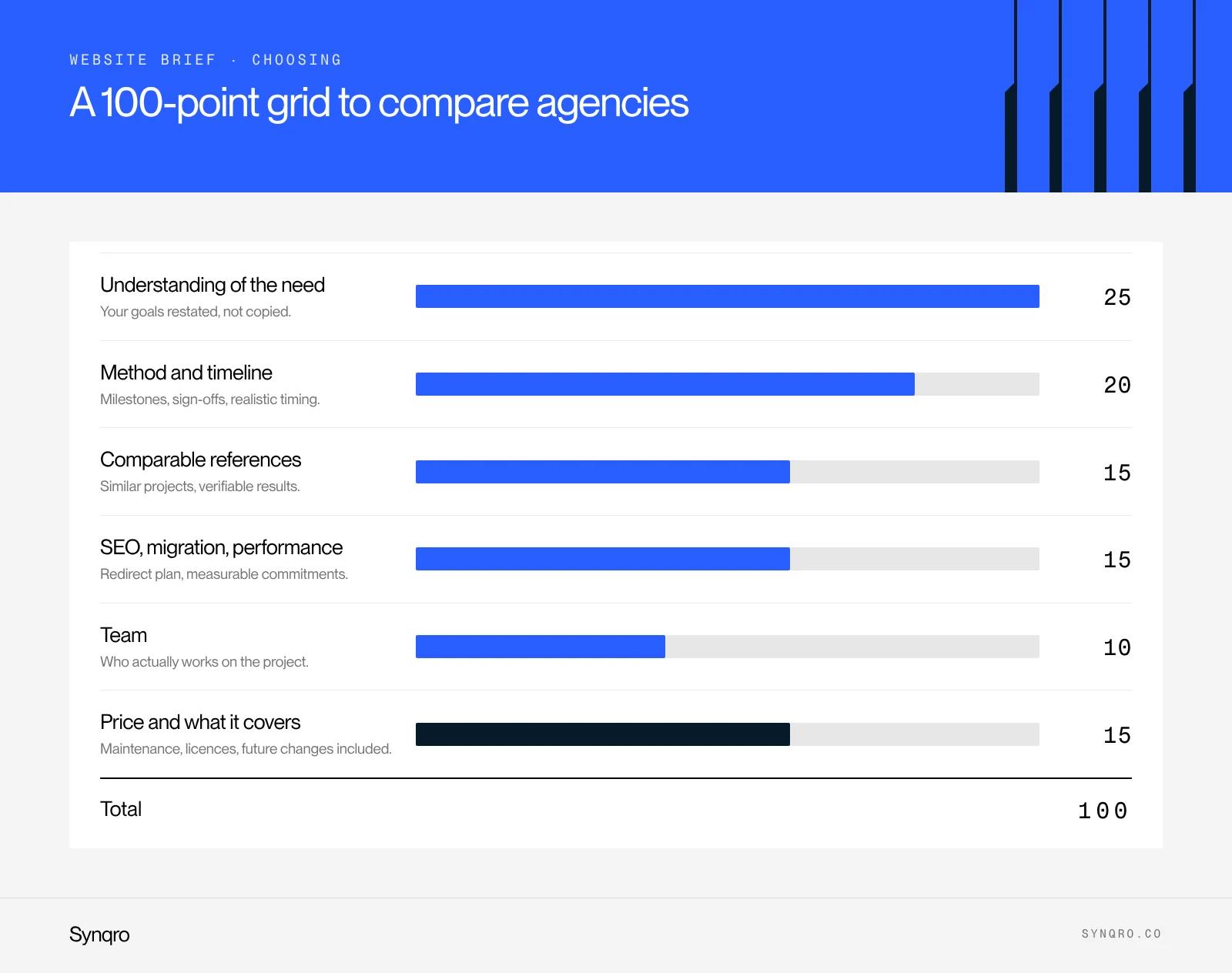
| Criterion | Weight | What to look at |
|---|---|---|
| Understanding of the need | 25 | Does the proposal restate your goals in its own words, or copy your document? |
| Method and timeline | 20 | Milestones, sign-offs, who does what, realistic timing |
| Comparable references | 15 | Projects close to yours, with verifiable results |
| SEO, migration and performance | 15 | Redirect plan, measurable commitments, post-launch monitoring |
| Team | 10 | Who will actually work on the project, and for how long |
| Price and what it covers | 15 | The total, but also maintenance, licences and future changes |
Price is only 15 points out of 100. Not because it does not matter, but because a low quote on a misunderstood project costs more in the end. To check references, ask to see a delivered site and the result it achieved. For example, our work on landing pages and interactive tools for Qobra tripled inbound leads and grew organic traffic sixteenfold.
Should you impose the platform: Webflow, WordPress or custom code?
Only if you have a real reason: a team already trained, a business tool to integrate, a security constraint. Otherwise, describe your needs (who publishes, how often, in how many languages, with which integrations) and ask the agency to justify its choice.
A few pointers for reading those justifications:
- Webflow fits when the marketing team must publish on its own and fast, with no plugins to maintain. It is our speciality as a Webflow agency, and we cover its limits in our Webflow vs WordPress comparison.
- WordPress still makes sense for a catalogue that depends on many plugins, or a team that already knows it well.
- A headless CMS with custom code, like our own site, is justified for advanced editorial or technical needs. See our article on headless CMS.
The most common mistakes
- Copying a template without filling it in. A generic brief gets generic quotes.
- Describing solutions instead of needs. The agency executes, but nobody checks the solution solves the problem.
- Forgetting content. Copy and images are the first cause of delays. Decide who produces them before signing.
- Hiding the budget. Quotes stop being comparable.
- Ignoring what comes after. Who owns the site, the logins, the domain name? Who fixes a bug in three months? Write it down.
A website brief template to copy
No form. Here is the outline we recommend. Reuse the headings, fill in each line, delete what does not apply.
- Context: company overview, offer, market, three competitors and their sites.
- Goals: two or three measurable goals, the metric for each, the time frame.
- Audiences: two to four profiles, what they look for, the action expected on the site.
- Current site: URL, monthly traffic, most visited pages, what works, what does not.
- Content: list of pages, languages, who writes, who supplies visuals, copy delivery date.
- Identity: existing guidelines or to be created, reference sites and what you like about them.
- Features: numbered requirements, must-have or nice-to-have.
- Tech, SEO and migration: platform constraints, hosting, redirect map, Search Console monitoring, performance criteria.
- Budget and timeline: budget range excluding VAT, launch date, milestones, who signs off.
- Acceptance and post-launch: acceptance criteria, training, maintenance, ownership of logins and code.
- How to respond: deadline, expected format, scoring grid.
Frequently asked questions
A website brief is the document that describes what a site must achieve, for whom, with which content and features, on what budget and timeline. It is used to get comparable quotes and to check the site at delivery.


