Article
What is a landing page? Definition, types and how to convert
Webflow14 min read

James BrunettoCo-fondateur & CEO
A landing page is a page designed for a single action: filling out a form, booking a slot, downloading a document or buying. Visitors arrive from a specific channel (an ad, an email, an article, a post) and find only one possible path.
This guide covers the definition, how it differs from a regular page, the types of landing pages, the eight elements that make a page convert, and how to measure and improve it.
Explore this post with…
What is a landing page?
A landing page is a page designed for a single action. Visitors arrive from an ad, an email, an article or a post, and the page has only one job: get them to take that action, whether that means filling out a form, booking a slot, downloading a document or buying.
What sets it apart from the rest of your site is that one word: single. A homepage speaks to everyone and offers ten paths. A landing page speaks to a specific audience, arriving from a specific channel, and offers only one path.
That is also what makes it measurable. Since there is only one possible action, there is only one number to watch: the percentage of visitors who take it.
Landing page vs. regular page: five differences
The goal
A website page informs, presents and reassures. A landing page converts. Anything that does not serve the conversion can come off the page, including content that is genuinely interesting.
Navigation
A landing page removes or slims down the menu. Every outbound link is an exit that pulls attention away from the expected action. Removing the main menu is often one of the first tests to run.
Content
One message, one promise, one proof, one call to action, repeated as the visitor scrolls. Not three offers side by side. If you have three offers, you need three landing pages.
Traffic source
A website page gets traffic from everywhere. A landing page gets traffic from one identified channel, and its message must reuse the exact words of the ad or email that brought the visitor. This continuity between the promise and the page is the first conversion lever, ahead of design.
Measurement
A website page is judged on traffic and time on page. A landing page is judged on its conversion rate, and nothing else.
The main types of landing pages
Marketing literature lists about ten of them, but most are variations of five families.
The lead capture page
It trades content for an email address: a white paper, a template, a study, a webinar. Short form, clear promise, no distractions. It is the most common format in B2B.
The click-through page
It has no form. It prepares the decision and sends visitors to the next step: a free trial, a meeting booking or a checkout flow. Useful when the final action requires a stronger commitment.
The sales page
Long and well argued, with objections handled one by one, pricing, guarantees and testimonials. It carries the entire job of persuasion on its own.
The registration page
For an event, a waitlist, a launch. It plays on the date and on scarcity, and often needs nothing more than an email field and a countdown.
The thank-you page
The one everyone neglects. The visitor just said yes: it is the right moment to offer the next step, book a call, read a case study, join the newsletter. A well-designed thank-you page sets up the next conversion.
Other formats you will come across
Marketing jargon names about ten variants, all of which belong to the five families above.
A squeeze page is a lead capture page stripped to the essentials, often a headline and an email field, with no other information.
A splash page appears before visitors reach the content, to announce something new, ask for a language preference or verify age. It informs more than it converts.
A video landing page hands the pitch to a video, with the form below or beside it. It works well for products that are hard to explain in writing.
An advertorial takes the form of an editorial article and gradually leads to the offer. It requires real writing quality, or it will come across as misleading.
A lead magnet page trades high-value content for contact details: a template, a calculator, an industry study. It is a lead capture page whose promise is a specific deliverable.
A pre-launch page builds a waitlist before a product opens, relying on the date and on scarcity.
The unsubscribe page rarely gets any attention, which is a mistake: it is the place to offer fewer emails instead of stopping everything.
A referral page gives your customers what they need to recommend your offer, with a trackable link and a clear reward.
The 404 page can be treated as a landing page. Instead of a blunt error message, it suggests the most useful pages and wins back some of the lost visitors.
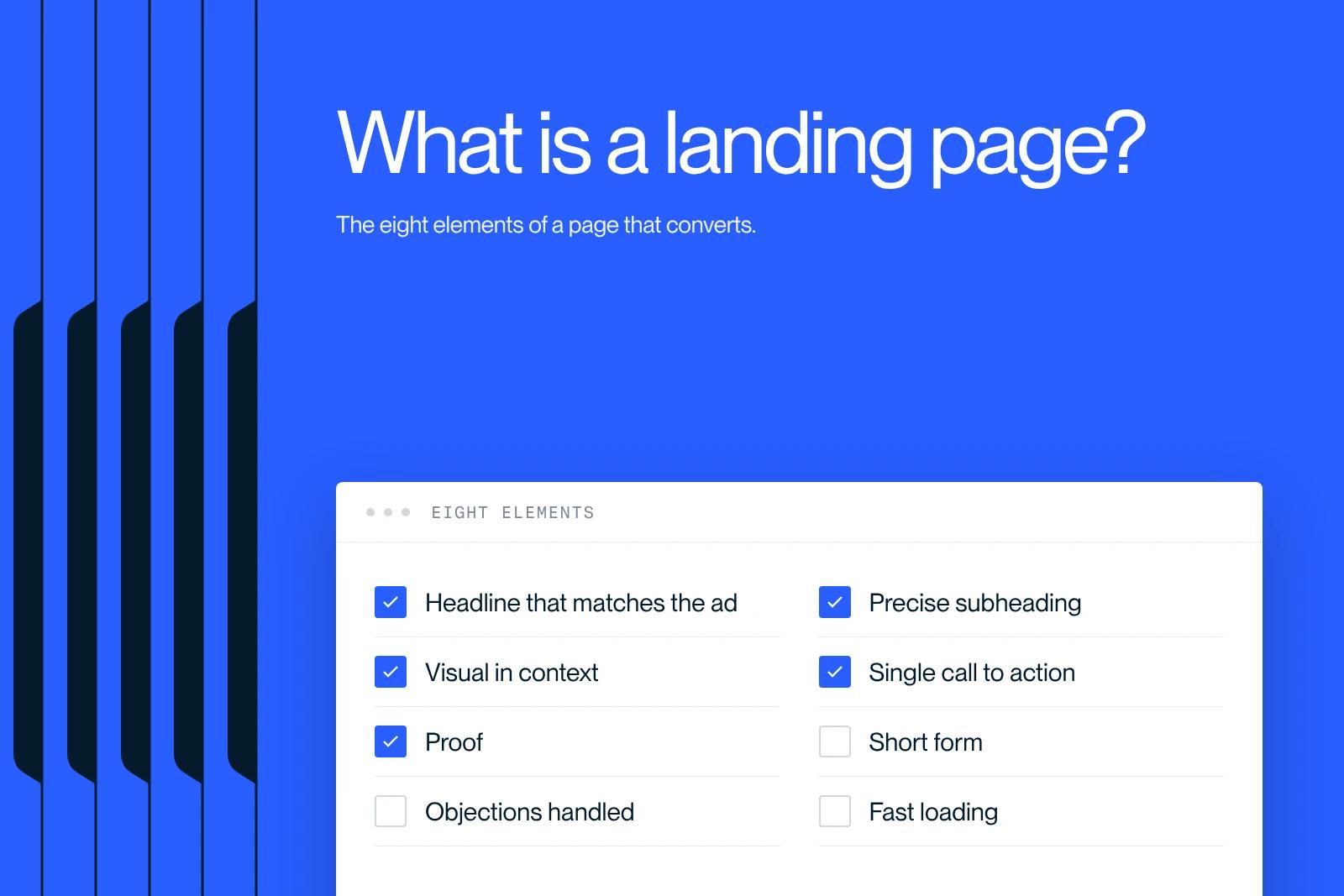
The eight elements of a landing page that converts
A headline that repeats the promise of the ad, not the name of your product. Visitors must recognize what they clicked on within one second.
A subheadline that says who it is for and what it concretely changes.
A visual that shows the result or the product in use, not a generic stock photo.
A single call to action, repeated two or three times as the visitor scrolls, with a label that describes the real action. "Book a 20-minute slot" converts better than "Submit".
Proof: client logos, figures, named testimonials, concrete cases. In B2B, proof carries more weight than the pitch.
A form as short as possible. Every extra field is one more reason to abandon. Ask for what you need to call back, not what would be handy to have in the CRM.
Objection handling: price, commitment length, setup time, what happens after the form is sent.
Decent loading speed. A slow landing page loses visitors before it is even read, so keep an eye on its Core Web Vitals. On Google Ads, the official help page on Quality Score lists "landing page experience" as one of its three components, along with expected click-through rate and ad relevance.
Where to host a landing page and how to promote it
A landing page lives on your domain, in a dedicated subfolder such as yoursite.com/offer-x. Keeping it on your domain rather than on an external tool preserves authority and lets you rank it if you want to.
It usually does not appear in the main menu. Visitors reach it through a channel.
Paid ads are the original use case. One landing page per ad group, using the same wording as the ad, with clean tracking of campaign parameters. Our guide to Google Tag Manager covers the measurement side.
Email works well because the audience already knows you. Compare its conversion rate with paid traffic on the same page: the gap tells you whether the message fits each source.
Then there is content: an SEO article that tackles a problem can point to the landing page that offers the solution. It is the cheapest and most durable traffic.
Social media and partnerships round out the setup, as long as you adapt the message to each source.
Should you do SEO on a landing page?
It depends on its role. A page built for a one-off ad campaign does not need to be indexed and can carry a noindex tag, as documented by Google Search Central, so it does not muddy the site structure or compete with your SEO pages.
A landing page that targets a recurring commercial query, on the other hand, deserves real SEO work: a clear search intent, a carefully written title tag and meta description, content that truly answers the query, and internal links from your articles.
One word of caution: do not create two pages that target the same query. Two pages on the same topic compete instead of adding up, and Google ends up keeping neither. Our guide to keyword cannibalization explains how to spot the problem and fix it.
If your offer is software, our dedicated article on the SaaS landing page covers what is specific to that industry.
Measure and improve
The four metrics that matter
Conversion rate, meaning the number of completed actions divided by the number of visitors. It is the main number, and everything else serves to explain it.
Bounce rate and time on page, which tell you whether the promise of the ad matches the content of the page. A high bounce rate almost always signals a disconnect between the two.
Form abandonment rate, which isolates the problem when visitors start filling it in and then give up. Often one field too many.
Cost per acquisition, which puts the conversion rate in perspective. A page converting at 2% on well-targeted traffic is worth more than a page at 5% on traffic that will never buy.
Testing without fooling yourself
One test at a time. If you change the headline, the visual and the button at once, you will know something moved without knowing why.
Test what has the most impact first: the headline, then the call to action, then the form, and design last. The opposite of what most people assume.
Let it run long enough for the result to mean something. On small volumes, a two-point gap proves nothing at all.
Finally, watch session recordings and heatmaps before deciding what to test. They show where visitors drop off, which no table of numbers will tell you.
Real-world examples
A software company runs a paid campaign on one specific feature. It creates a page dedicated to that feature, with the same wording as the ad, a visual demo and a button to book a demo. The traffic never lands on the homepage.
A consulting firm publishes an industry study. The download page asks for two fields, shows the study's table of contents and two chart excerpts. It then becomes the destination for every email and post about the study.
An agency hosts a webinar. The page announces the date, the format, the speakers and what attendees will be able to do afterward. After sign-up, the thank-you page offers to book a call without waiting for the webinar.
In all three cases, the structure is the same: one audience, one promise, one action.
Choosing the tool
Three families of tools coexist, and the right choice depends mostly on who will maintain the pages.
Dedicated page builders produce a page in minutes from a template. They are quick to learn, but the pages live on a third-party domain or a subdomain, with limited control over design and performance.
CMS plugins add a builder to an existing site. They stay consistent with the rest of the site, at the cost of extra maintenance and often heavier pages.
Visual platforms like Webflow let you build the page on your own domain, with no template constraints, and then duplicate it without a developer. It is the option that costs the most to set up and the least to keep running.
The deciding factor is not the first page, it is the tenth. Ask yourself how long it will take your marketing team to launch a new campaign six months from now, without outside help.
Building a landing page in Webflow
Webflow is especially well suited to landing pages for three practical reasons.
Layout freedom. You are not locked into a template, which matters when every section must serve a specific argument.
Marketing team autonomy. Once the components are in place, duplicating a page for a new campaign takes no developer. That is the real gain when you launch several campaigns per quarter.
Performance. Pages are served fast by default, which matters for campaign costs and for SEO.
In practice, start from a reusable section component rather than a blank page. Name your classes following the Client-First method so the page is still easy to edit six months from now. And design the mobile version from the start: check the share of mobile traffic for each campaign in your analytics, it is often high on social media.
To get started, our Webflow guide for beginners covers the basics, the free Webflow training goes further, and our selection of Webflow templates gives you starting points. On the budget side, the article on the cost of a Webflow website breaks down the plans.
At Synqro, a landing page is delivered in two weeks. The long part is never the build in Webflow: it is the message, which we craft from the client's real material (brochures, figures, case studies) rather than generic formulas. For Qobra, the work on landing pages and interactive tools brought three times more leads and sixteen times more organic traffic. When the positioning itself is unclear, our branding team clarifies it before the page is written.
The most common mistakes
Sending ad traffic to the homepage. This is by far the most common and most costly mistake. The homepage speaks to everyone, so it speaks to no one in particular.
Promising one thing in the ad and showing another on the page. The visitor leaves within two seconds.
Piling up calls to action. Two offers on the same page split attention and the conversion rate.
Asking for too much information. Phone number, company size and expected budget at first contact cost more leads than they qualify.
Keeping the full menu. Every link is a possible exit.
Measuring nothing. A landing page without conversion tracking is spending with no visible return.
Never updating it. A campaign page that runs for a year without changes wears out, especially on paid traffic.
Getting expert support
A good landing page is not a matter of design. It is a matter of message, proof and measurement. Design comes after, to serve all three.
Synqro is a brand, web and visibility agency and a Webflow Premium Partner, founded in 2019, with more than 150 companies supported and a French-speaking team. We build landing page systems that marketing teams duplicate on their own, rather than one-off pages to rebuild for every campaign. Our Webflow agency page explains our method.
Frequently asked questions
The homepage speaks to all visitors and offers several paths. A landing page speaks to a specific audience arriving from a specific channel, and offers only one action.


